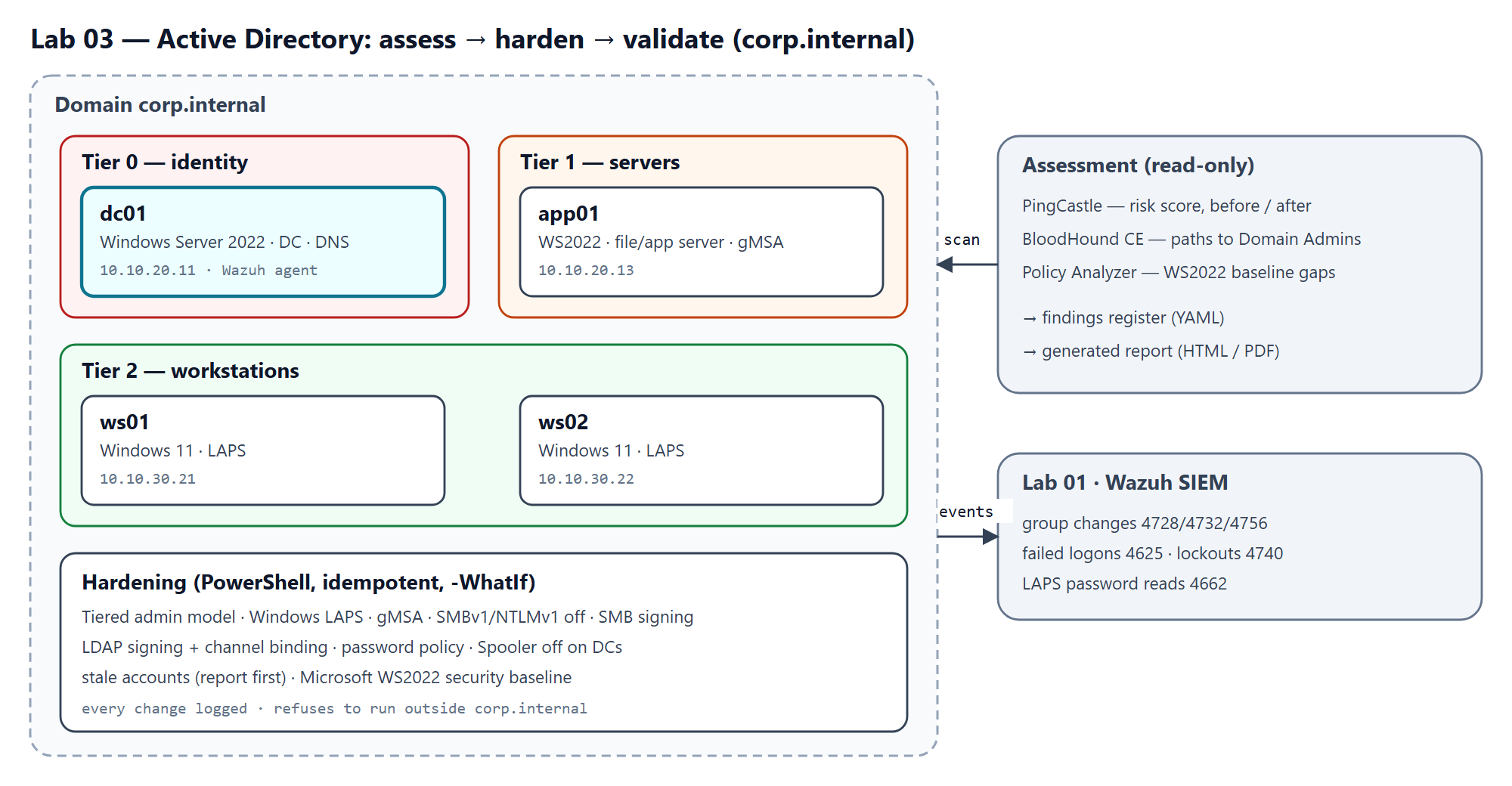
TL;DR — Design for a defensive Active Directory engagement at a fictional 40-person company: eleven typical small-business weaknesses, an assessment plan with PingCastle, BloodHound CE and Microsoft's security baseline, hardening delivered as idempotent PowerShell that refuses to run outside the lab domain, and tooling that turns the before/after scans into a findings register and a professional report. Deliverable: plan, scripts and tooling, ready to build; lab results not yet measured.
| Role played | Security consultant assessing and hardening a small company's domain |
| Environment | corp.internal on Proxmox: one DC, one member server, two workstations (Labs 01–02 network) |
| Tools | PingCastle, BloodHound CE, Microsoft Security Compliance Toolkit, PowerShell, Pester, Python |
| Deliverable | Weakness catalogue, assessment guides, 9 hardening scripts, findings register, report generator |
1. Problem
- Context: a fictional professional-services company whose domain grew by "whatever worked": a service account in Domain Admins, one local admin password everywhere, legacy protocols left on, and administrators using the same account for email and for the domain controller.
- Why it matters: in Active Directory, one weak link usually leads to everything. A single compromised workstation or service can become full control of the domain.
- Goals:
- Find the weaknesses with established, read-only audit tools.
- Rate each one by business risk and record it with evidence.
- Fix them in a way that is repeatable, reviewable and safe to re-run.
- Prove the fixes with the same tools, and confirm the SIEM sees the changes that matter.
- Constraints: isolated lab only; free tools; no exploitation. The story is found → fixed → proved.
- Success criteria: every finding closed or consciously accepted with verification; a lower PingCastle risk score; no path to Domain Admins left in BloodHound; key events visible in Wazuh.
2. Architecture
| Host | OS | Zone / IP | Role |
|---|---|---|---|
| dc01 | Windows Server 2022 | SERVERS · 10.10.20.11 | Domain controller and DNS (Tier 0) |
| app01 | Windows Server 2022 | SERVERS · 10.10.20.13 | File and application server (Tier 1) |
| ws01 | Windows 11 | USERS · 10.10.30.21 | Workstation (Tier 2) |
| ws02 | Windows 11 | USERS · 10.10.30.22 | Workstation (Tier 2) |
| Decision | Alternatives considered | Why this one |
|---|---|---|
corp.internal |
lab.local; a subdomain of a real domain |
.internal is reserved by ICANN for private use; .local clashes with mDNS |
| Weaknesses applied by hand from a catalogue | A script that creates them | The repository only automates fixes; the weakness list doubles as a checklist for real assessments |
| One PowerShell script per control | One big hardening script | Each control can be reviewed, tested and rolled out on its own |
| Guard against the wrong domain | Trusting the operator | A script copied to a real network refuses to run unless forced |
| Findings register as YAML | A spreadsheet | The same file drives the findings table and the report; "fixed" requires proof |
3. Build
- Build the domain: promote dc01, join the members, run
New-LabDomainStructure.ps1. - Apply the baseline weaknesses W01–W11 and snapshot the VMs.
- Run the before assessment (PingCastle, BloodHound CE, Policy Analyzer) and record the evidence in findings/findings.yaml.
- Harden, reviewing each script with
-WhatIffirst:
| Script | Fixes |
|---|---|
Set-TieredAdminModel.ps1 |
W07, W09 — tier groups, helpdesk delegation only on user OUs, Tier 0 denied on workstations and servers |
Enable-WindowsLaps.ps1 |
W03 — unique, rotated, encrypted local admin passwords: workstation passwords readable only by Tier 2 admins, server passwords only by Tier 1 |
Convert-ServiceAccountToGmsa.ps1 |
W01, W02 — service account replaced by a gMSA, removed from Domain Admins |
Disable-LegacyProtocols.ps1 |
W04, W05 — SMBv1 off, SMB signing required, NTLMv2 only |
Set-LdapSigning.ps1 |
W06 — LDAP signing required, channel binding enforced |
Set-PasswordPolicy.ps1 |
W10 — length 14 and lockout; length 20 for Tier 0 admins |
Disable-SpoolerOnDC.ps1 |
W11 |
Get-StaleAccounts.ps1 |
W08 — report first, disable only with -Disable |
Import-SecurityBaseline.ps1 |
Microsoft's Windows Server 2022 baseline GPOs |
- Run the after assessment, update the findings, run the SIEM checks, and generate
the report:
python -m adlab.report --pdf.
4. Assessment plan
- PingCastle gives the headline number: a risk score that should drop after hardening.
- BloodHound CE shows relationships: the service account, the helpdesk delegation and admin sessions on workstations should appear as paths to Domain Admins before, and be gone after.
- Policy Analyzer compares the applied policies with Microsoft's baseline.
- Wazuh (Lab 01) must show group changes, failed logons, lockouts and LAPS password reads (docs/siem-checks.md).
5. Deliverables and measurement
Delivered in this repository:
- A catalogue of eleven weaknesses with why they're common, how to reproduce them and which tool flags them.
- Nine hardening scripts plus a domain-build script: idempotent,
-WhatIf-aware, logging every change and refusing to run outsidecorp.internal. Each has Pester 5 tests (61, passing in CI with PSScriptAnalyzer clean) that run the scripts against stand-in AD cmdlets; they caught a bug where-WhatIfdidn't reach a shared helper. - A findings register that rejects "fixed" without proof, a PingCastle score parser, and a report generator that stays marked Draft until real before/after scans exist.
How results are measured:
| Metric | Source |
|---|---|
| PingCastle global score and sub-scores, before → after | python -m adlab.scores |
| Findings fixed / accepted with verification | python -m adlab.findings findings/findings.yaml |
| Paths to Domain Admins, before → after | BloodHound CE |
| SIEM checks passed | tests/test-plan.md |
6. Design lessons and roadmap
- Automate the fix, not the flaw. The repository contains no code that makes a domain weaker, which keeps it safe to publish and makes the weakness catalogue reusable as an audit checklist.
- Make "preview" trustworthy.
-WhatIfis only useful if it's reliable: preference variables don't flow into PowerShell module functions, so a shared helper silently made changes during a preview until the call passed-WhatIfthrough explicitly. Testing the preview itself found it. - Guard the blast radius. Every script checks it's running against the lab domain, including look-alikes such
as
xcorp.internal, before touching anything. - Not everything fits the tidy cmdlets. User-rights assignments (tiering's deny-logon rights) can't be set with the registry-based GPO cmdlets and need the GPO's security template; that script gets the most careful review.
- Stand-ins must cover everything. Two AD cmdlets had no test stand-in; on a machine with the admin tools installed the tests quietly called the real ones, and only CI, without them, failed. A test now checks that every AD and Group Policy command the scripts use has a stand-in.
- "Fixed" needs proof. The register refuses a fixed finding without
verified_by, and the report stays a draft until the after-scan exists.
Review fixes: a review of the scripts found issues — the GPO version file in the wrong folder, security options that the default domain policies would override, the password policy set where the Default Domain Policy would revert it, the LAPS policy key and encryption, and member servers sharing the workstations' LAPS readers. They are fixed and covered by tests, and the Pester suite passes in CI. They have not run against a real domain yet: the test plan lists the checks for that.
Roadmap: build the lab, run the before/after assessments, publish the measured score change, and extend with Active Directory Certificate Services hardening.
7. Reproduce it yourself
- Clone:
git clone https://github.com/santorest/lab-03-ad-assess-harden.git - Download bundle: from the portfolio site (SHA-256 shown next to the download).
- Estimated time: 2–3 days, including both assessments.
- Teardown: revert to the clean-baseline snapshot or delete the VMs.
8. Mapping
| Control | Framework | How this project addresses it |
|---|---|---|
| 5.4 Restrict administrator privileges to dedicated administrator accounts | CIS Controls v8 | Tiered admin model, Tier 0 logon restrictions |
| 5.2 Use unique passwords | CIS Controls v8 | Windows LAPS, gMSA |
| 5.3 Disable dormant accounts | CIS Controls v8 | Stale-account review |
| 4.1 Establish and maintain a secure configuration process | CIS Controls v8 | Microsoft baseline, legacy protocols off, LDAP signing |
| 6.8 Define and maintain role-based access control | CIS Controls v8 | Helpdesk delegation limited to user OUs |
| PR.AA Identity management, authentication and access control | NIST CSF 2.0 | The identity controls above |
All testing is performed in an isolated lab environment I own. No real organization's data, hostnames or configurations are included.