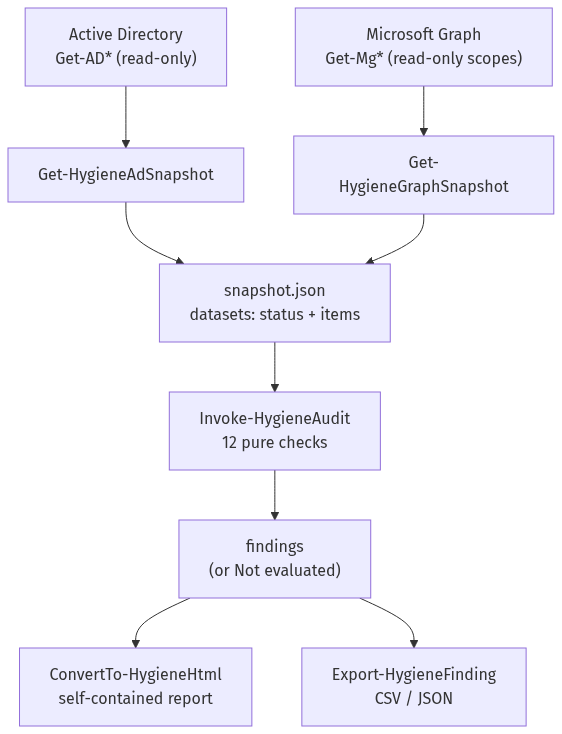
TL;DR: A read-only PowerShell module that collects an Active Directory and Microsoft 365 snapshot with least privilege, runs twelve hygiene checks over it (stale and roastable accounts, unconstrained delegation, MFA gaps, unused licenses, standing admin roles, stale guests) and writes a self-contained HTML report. CI proves every check on Windows PowerShell 5.1, PowerShell 7 on Windows and PowerShell 7 on Linux. The CI runs are real; the snapshots are synthetic. The toolkit has never been run against a real domain or tenant.
| Role played | Identity / systems engineer building a repeatable hygiene review for AD and Microsoft 365 |
| Environment | Public GitHub repository, GitHub-hosted Windows and Ubuntu runners |
| Tools | PowerShell 5.1 and 7, Pester 5.7.1, PSScriptAnalyzer 1.23.0, gitleaks |
| Deliverable | Module with 12 checks, collectors, HTML/CSV/JSON output, example report, CI matrix, branch ruleset, demo PRs |
1. Problem
Directory hygiene drifts quietly: accounts nobody uses, service accounts with SPNs and non-expiring passwords, privileged groups that grow, licenses on disabled users, Global Administrators with standing access. Most teams check this with one-off scripts that need admin rights, write straight to the console and are never tested. The goal here: a toolkit that needs only read access, keeps collection separate from analysis, and has every check proven in CI.
2. Design
- Collect, then analyze.
Get-HygieneAdSnapshotandGet-HygieneGraphSnapshotare the only functions that call AD or Graph cmdlets. They build a snapshot of datasets, each{status, error, items}. The snapshot can be saved, moved and analyzed later, anywhere. - Pure checks. Each of the twelve checks is a function over the snapshot and the settings. Ages are counted from
the snapshot's
collectedAt, never from the clock, so results (and the example report) are reproducible. - "Not evaluated" instead of silence. If a check's data was not collected, or a collector call failed for permissions or licensing, the check returns one finding saying so and why. A missing licence never looks like a clean tenant.
- Read-only by construction. A test parses the module and fails if any AD or Graph cmdlet other than
Get-*appears, or a rawInvoke-MgGraphRequest. - Safe report. One HTML file, inline CSS, no scripts or external resources, every value HTML-encoded (directory attributes are attacker-controllable), links taken only from the check catalog.
3. Checks
| Id | Check | Flags |
|---|---|---|
| AD-01 | Stale users | No logon in more than 90 days (or never, and created more than 90 days ago) |
| AD-02 | Stale computers | No logon in more than 90 days |
| AD-03 | Passwords that never expire | PasswordNeverExpires on enabled users |
| AD-04 | Privileged group membership | Disabled or inactive members (nesting path shown); groups above 5 members |
| AD-05 | Kerberoastable users | Users with an SPN; High when privileged |
| AD-06 | AS-REP roastable users | Pre-authentication disabled |
| AD-07 | Unconstrained delegation | Computers and users, domain controllers excluded |
| M365-01 | Users without MFA | Enabled members not registered |
| M365-02 | Unused licenses | Unassigned seats; licenses on disabled or inactive users |
| M365-03 | Global Administrator count | Fewer than 2 or more than 4 |
| M365-04 | Permanent privileged roles | Standing assignments with no PIM eligibility |
| M365-05 | Stale guests | Pending invitations over 30 days; no sign-in over 60 days |
4. Permissions
Active Directory: any authenticated domain user (the attributes read are readable by default). Microsoft Graph:
User.Read.All, AuditLog.Read.All, Directory.Read.All, RoleManagement.Read.Directory. Sign-in activity needs
Microsoft Entra ID P1 and PIM eligibility needs P2; without them the affected checks report "not evaluated".
5. Pipeline
GitHub Actions runs Pester 5.7.1 on three runtimes (Windows PowerShell 5.1, PowerShell 7 on Windows, PowerShell 7 on
Linux), PSScriptAnalyzer 1.23.0 with zero findings, and gitleaks over the full history. A branch ruleset requires a
pull request and all five checks. Tests cover every check with positive and near-miss cases, the collectors with
mocks (properties requested, paging, the unavailable path), the read-only guard, HTML encoding, and an example report
that must match docs/example-report.html byte for byte on every runtime.
6. Results
All numbers below come from GitHub Actions runs on 2026-09-30.
Baseline run on main (run 36779778283):
all 5 checks passed on the first run, in 50 seconds wall-clock.
| Check | Result |
|---|---|
pester-windows-powershell (5.1) |
81 tests passed, 0 failed |
pester-pwsh-windows (7) |
81 tests passed, 0 failed |
pester-pwsh-linux (7) |
81 tests passed, 0 failed |
analyzer |
PSScriptAnalyzer 1.23.0: 0 findings |
secrets |
gitleaks: no leaks found |
The example-report test is part of those 81, so docs/example-report.html was regenerated byte for byte on Windows
PowerShell 5.1, PowerShell 7 on Windows and PowerShell 7 on Linux. From the synthetic corp fixture it reports
4 High, 11 Medium and 5 Low findings, and M365-04 as not evaluated (the fixture has no Entra ID P2).
Ruleset 24274079 on main: pull request required, all 5 checks required and up to date, linear history, no
force pushes or deletion.
Two demo pull requests, both blocked (closed unmerged):
| PR | Change | What failed | Merge |
|---|---|---|---|
| #1 | Off-by-one: "stale" became N or more days instead of more than N | All three Pester jobs, 5 failures each: the exactly-90-days near misses in AD-01, AD-02 and M365-02, the exactly-60-days guest in M365-05, and the boundary test of the helper (run) | Blocked |
| #2 | A collector "optimisation" that calls Set-ADUser to tag audited accounts |
All three Pester jobs, 3 failures each; the read-only guard reported AdSnapshot.ps1:24 Set-ADUser (run) |
Blocked |
In both PRs the analyzer and gitleaks passed: only the tests stood between each change and main.
Final review fix pass (PR #4,
run 36889200159, 2026-10-01). An
independent review found three defects, each fixed with a test that failed first (8 new or extended tests failed, then
passed). First, a filter that matched no findings crashed the HTML report and the export. Second, a Microsoft 365
account with no sign-in and no creation date was silently treated as active. Third, the read-only guard compared
command names case-sensitively, so Set-AdUser would have passed. All 5 checks then passed, with 90 Pester tests
passed and 0 failed on each of the three runtimes, PSScriptAnalyzer at 0 findings, and the example report unchanged.
7. Lessons
- Windows PowerShell 5.1 is where the bugs hide. A one-item result is unrolled into a single object, and 5.1's
PSCustomObjecthas no.Count. A test for a snapshot with a single user caught it in the test helper. - Pester 5 mocks have their own rules. A mocked call's bound parameters are
$PesterBoundParameters, not$PSBoundParameters, and calls made in a file-levelBeforeAllare not counted by anIt-levelShould -Invoke. Both made correct collector code look broken until the tests were fixed. - Encoding is a Windows PowerShell 5.1 trap. Without a BOM, 5.1 reads UTF-8 files as the local code page, so the manifest (which contains a non-ASCII author name) carries a BOM and PSScriptAnalyzer enforces it.
- Dates differ by runtime. PowerShell 7's
ConvertFrom-Jsonturns ISO strings intoDateTimevalues, while 5.1 keeps strings. One conversion function handles both, and running every test on both runtimes proves it.
8. Limits
- Never run against a real domain or tenant; findings on real data are not claimed.
lastLogonTimestampreplicates with a lag of up to about 14 days, so "stale" is approximate by design.- M365-04 is a heuristic: a principal with both a standing and an eligible assignment for the same role is not flagged.
- The Graph collector is modelled on the Microsoft.Graph PowerShell SDK 2.x cmdlets and tested with stubs, not against the SDK.
9. Reproduce it
- Fork the repository and enable GitHub Actions.
- Apply
.github/rulesets/main.jsonas a branch ruleset. - Locally:
./scripts/Install-TestDependencies.ps1, then./scripts/Invoke-Tests.ps1. - To audit a real environment (read-only): follow the quick start in the README.
10. Mapping
- CIS Controls v8: 5.1 (account inventory), 5.3 (disable dormant accounts), 6.1/6.8 (access granting and role-based access).
- MITRE ATT&CK: T1558.003 (Kerberoasting), T1558.004 (AS-REP roasting), T1078 (valid accounts).