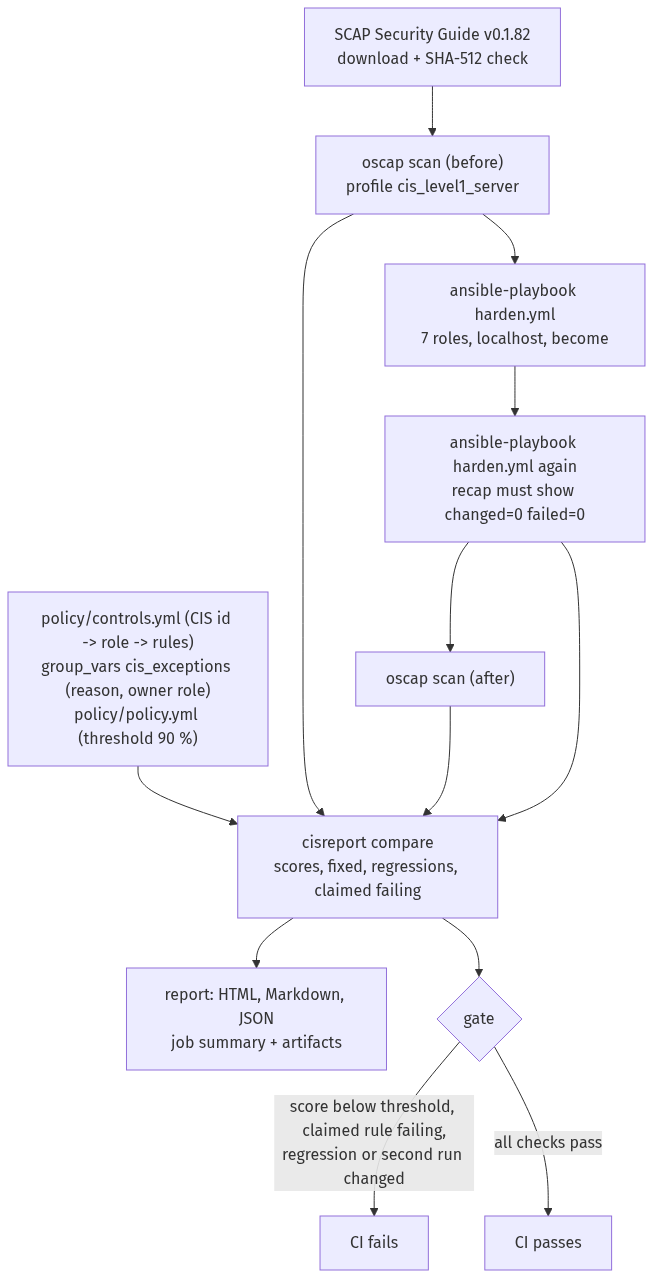
TL;DR: Seven Ansible roles, one per CIS section group, harden a default Ubuntu 24.04 server to CIS Level 1 – Server. OpenSCAP scans the machine before and after with the ComplianceAsCode profile, the playbook runs a second time to prove it changes nothing, and a small Python tool compares the scans and fails CI on a low score, a claimed control that still fails, a regression or a second run that changes something. Every control is traceable from its CIS id to the role that applies it and to the scanner rules that check it. Everything runs in GitHub Actions on a disposable runner. The CI runs are real; the host is a disposable CI runner.
| Role played | Systems / security engineer who owns the hardening baseline for a fleet of Ubuntu servers |
| Environment | Public GitHub repository, GitHub-hosted ubuntu-24.04 runner VMs, Docker containers for role tests |
| Tools | Ansible (ansible-core 2.21), OpenSCAP, SCAP Security Guide v0.1.82, Molecule, ansible-lint, yamllint, Python 3.12, pytest, ruff, mypy, shellcheck, gitleaks |
| Deliverable | Seven hardening roles, controls map with documented exceptions, scan-compare-gate tool (cisreport), CI with role tests and the real cycle, branch ruleset, demo PRs |
1. Problem
A hardening baseline usually lives in two places that drift apart: a script or playbook that someone wrote once, and a benchmark document that auditors read. Nobody can say which CIS control a given task implements, whether the server still passes after the last change, or which controls were skipped on purpose and why. And a playbook that reports changes on every run hides real drift in noise.
2. Design
- Own roles by section. Seven roles follow the benchmark's sections (initial setup, services, network, firewall, access, logging, maintenance). Every task is named and tagged with its CIS id, so a control can be found, run or skipped on its own.
- An independent scanner. The roles do not grade themselves. OpenSCAP with the ComplianceAsCode profile
cis_level1_serverfrom a pinned SCAP Security Guide release (checked by SHA-512) scans before and after. If the release changes or disappears, the run stops; the scanner is never swapped silently. - Claims from the real baseline.
policy/controls.ymlmaps each CIS id to its role and to the scanner rules that check it. It was built from the first baseline scan of a default runner: every rule that failed and that a role fixes, plus the rules that only apply once a role installs their package — 91 controls, 126 rules. If any of them still fails after hardening, CI fails. - Exceptions as data. A skipped control is an entry with the CIS id, its rules, a reason and an owner role. Tasks skip it, the report lists it and shows the score with and without it, and an exception for a rule the roles also claim, without a reason or for a rule the profile does not have, is a configuration error.
- Runner guardrails. The target is the runner itself, so the hardening must not cut the job off: outbound
traffic stays open on the ports the job needs (DNS, HTTP, HTTPS, NTP) and the
runneraccount keeps its sudo.
3. The cycle
- Download SCAP Security Guide v0.1.82 and verify its SHA-512.
- Scan before:
oscap xccdf eval --profile …cis_level1_server(ARF and HTML). ansible-playbook playbooks/harden.ymlagainstlocalhostwithbecome.- The same playbook again: the recap must show
changed=0andfailed=0. - Scan after with the same content.
cisreport reportcompares the scans and writes HTML, Markdown and JSON;cisreport gatedecides.
4. Measurement and gate
- Score = pass / (pass + fail) over the profile's selected rules, before and after, with all rules and excluding
the exception rules.
notapplicableandnotcheckeddo not count either way. - Fixed, regressions, claimed failing, open: rules that went from fail to pass; rules that went from pass to fail; claimed rules that still fail; failing rules that are neither claimed nor excepted.
- Gate (exit 1): the score excluding exceptions below 90 %, any claimed rule failing, any regression (even when
the overall score rose), or a second run with
changed > 0orfailed > 0. - Errors, not scores (exit 2): a missing, empty or truncated scan, a profile that selected no rules, no rule that
passed or failed, more than 5 % of the selected rules in
errorornotchecked, or a missing recap. A scan that did not happen must never read as 100 % or 0 %. A claimed rule that ends inerrorornotcheckedcounts as still failing.
5. Roles
| Role | CIS sections | What it does |
|---|---|---|
cis_initial_setup |
1.1, 1.3–1.6 | unused filesystem modules, /dev/shm options, AppArmor (utils, bootloader, unconfined profiles to complain), bootloader password, ASLR, ptrace and core dumps, login banners |
cis_services |
2.1–2.4 | unneeded servers and clients removed, time sync with systemd-timesyncd only, cron permissions |
cis_network |
3.2–3.3 | uncommon network protocols unavailable, network kernel parameters |
cis_firewall |
4.2 | ufw: loopback rules, explicit outbound rules, an inbound rule for every listening port, default deny in, out and routed |
cis_access |
5.1–5.4 | SSH drop-in, sudo (use_pty, log file, timeout, secure_path), su restriction, PAM password quality, faillock and history, ageing, system accounts, shell timeout and umask |
cis_logging |
6.1 | journald forwards to rsyslog, /var/log permissions and ownership |
cis_maintenance |
7.1–7.2 | account file permissions, world-writable files, unowned files, user dot files, empty passwords |
Exceptions (in inventory/group_vars/all.yml):
| CIS | Rules | Reason |
|---|---|---|
| 1.1.2.1.1 | partition_for_tmp |
a booted CI runner cannot be repartitioned |
| 4.3 | the nftables variant and package_ufw_removed |
CIS asks for one firewall utility and this lab uses ufw; the nftables rules cannot pass while ufw manages the firewall |
| 6.3.1 | package_aide_installed, aide_build_database |
building the AIDE database of a large, short-lived runner image did not finish in 15 minutes; file integrity monitoring belongs on long-lived servers |
6. Pipeline
| Job | What it proves |
|---|---|
lint |
yamllint, ansible-lint (production profile), ruff, mypy (strict), shellcheck |
unit |
cisreport on fixtures: parsing, empty and mismatched scans, exceptions, regressions, claimed failing, recap parsing, threshold edges, report escaping; coverage gate 90 % |
molecule |
each role in an Ubuntu 24.04 container: converge, idempotence, verify (tasks that need a real kernel, bootloader, firewall, running services or a whole filesystem are tagged to run only on the VM) |
harden |
the whole cycle on the runner VM; artifacts: scans, report, playbook logs; a Markdown job summary |
secrets |
gitleaks over the full history |
It runs on every pull request, on pushes to main, weekly and on demand.
7. Results
From run 37353023826 (2026-10-05), the final code after the
review fixes; docs/example-report.html is its report. OpenSCAP 1.3.9 (the runner's openscap-scanner package),
SCAP Security Guide v0.1.82, profile cis_level1_server (408 selected rules).
| Before | After | |
|---|---|---|
| Score, all rules | 64.5 % | 97.2 % |
| Score, excluding the documented exceptions | 66.3 % | 99.4 % |
| Pass / fail | 222 / 122 | 345 / 10 |
| Not applicable / not checked / error | 64 / 0 / 0 | 53 / 0 / 0 |
- Fixed: 110 rules went from fail to pass. Regressions: 0. Claimed rules still failing: 0 (91 CIS controls, 126 rules claimed).
- Still failing (10): the 8 rules of the documented exceptions (separate
/tmppartition, the nftables variant of the firewall section, AIDE) and 2 open items, reported, not claimed and not hidden: file_permission_user_init_files: the role sets every regular dot file in the home directories to0740or less, but the runner's home directories contain dot-name symbolic links (.ghcup), whose mode always reads as0777to the check.no_files_unowned_by_user: the only unowned files are inside Docker's image layers (/var/lib/docker/overlay2), whose UIDs exist only inside containers. The role deliberately leaves container storage alone — giving those files to root breaks containers on a real host.- The first green run, 37330148201, scored 97.5 % (99.7 % excluding exceptions) with only the first open item: the role then gave every unowned file to root, Docker's image layers included. The final review flagged that as unsafe on a real server; the 0.3-point drop is the price of the fix.
- Applicability moved too (not applicable 64 → 53): 15 rules became applicable and pass — 12 password-quality
rules once
libpam-pwqualityis installed and 3systemd-timesyncdrules — and 4 chrony rules became not applicable once chrony was removed. - Idempotency: first run
ok=77 changed=55 failed=0; second runok=68 changed=0 failed=0. - Time: the
hardenjob takes 12–16 minutes (two scans, two playbook runs); the whole pipeline about the same, since the other jobs run in parallel.
How it got there. The first complete cycle (run 37327562351) already scored 91.5 % (93.6 % excluding exceptions), over the 90 % threshold, and the gate still failed it: one regression, 8 claimed rules still failing and a second run that changed something. Each cause came from reading the scanner's own checks in the results file, and the fixes are in section 8.
Demo pull requests (closed unmerged; the ruleset blocks the merge):
| PR | Change | What happened |
|---|---|---|
| #1 | SSH PermitRootLogin yes in the cis_access defaults |
the score stayed at 97.2 % (99.4 % excluding exceptions), over the threshold, but the gate failed on the claimed rule sshd_disable_root_login (CIS 5.1.20); Molecule verify for cis_access failed on its PermitRootLogin no assertion |
| #2 | a shell task in cis_maintenance that writes the date to a log file, without changed_when |
ansible-lint failed (no-changed-when); Molecule's idempotence test failed for cis_maintenance; the harden gate failed with "second run is not idempotent: localhost changed=1" although the score was 97.5 % with no claimed rule failing |
8. Lessons
- The profile, not memory of the benchmark, decides what "compliant" means. The pinned profile expects
systemd-timesyncd(not chrony) for time sync, SSHLogLevel INFO, rsyslog as the logging path, and does not select auditd at Level 1. The roles were written from the list of rules that actually failed on the baseline scan (408 selected rules: 222 pass, 122 fail, 64 not applicable), not from a reading of the benchmark. - Small file details break privileged changes. The feasibility spike wrote its sudoers drop-in with
tee, which left it0644, andvisudo -crejected it; the role writes0440and validates its own file before installing it. On the runner, two AppArmor profiles claim the same browser binary, soaa-complainrefuses to run at all; the role edits the unconfined flag in each profile directly and reloads only the profiles it changed. - A service that has never run leaves no runtime directory. SSH on the runner is socket-activated, so
/run/sshddoes not exist andsshd -trefuses to validate a config; the role creates the directory first. - Some controls do not fit a short-lived machine. Installing AIDE pulled in a mail server, and building its database did not finish in 15 minutes on the runner's large image; it became a documented exception instead of a quietly skipped task.
- Tools read configuration from where they run. Molecule runs from the role's directory, where the repository's
ansible.cfg(and its collections path) is not read; CI passes the collections path explicitly. - Another component can undo a setting. ufw re-applies its own
/etc/ufw/sysctl.conf(withlog_martians=0) when it is enabled, and Ubuntu's10-network-security.confsetsrp_filter=2. Our sysctl file was right, yet the scanner failed four rules and the second playbook run "fixed" the value again — which is how the idempotency check found it. The role now makes every file that sets those keys agree. - The check reads one file; the tool reads several.
pam_pwqualityreadspwquality.conf.d, but the profile's checks read onlypwquality.conf, and theTMOUTcheck matches one exact three-line form. Settings that work are not always settings the scanner can see; the role writes them where and how the check looks. - Fixing one rule can break another. Creating
/etc/cron.allow(a rule that failed) with the wrong group made a rule that had passed — because the file did not exist — fail. The gate's regression check caught it even though the overall score had risen. - Per-item loops do not scale to a real image. The runner has more than 15,000 world-writable files under its
toolchains; one Ansible module call per file ran for 54 minutes and hit the job timeout. One
find … -exec … {} +per rule does the same work in seconds and still reports whether anything changed. - A configuration file in the wrong folder is silently ignored. The exceptions and tunables lived in a
group_vars/folder at the repository root, wherecisreportread them but Ansible does not look; the play ran on the role defaults. It changed little — the excepted tasks were also off by default, and only the SSHAllowGroupslist differed — and it surfaced only when the final review added an SSH lockout check. The file now sits next to the inventory, and CI fails if the play cannot see the exceptions.
9. Limits
- The target is a GitHub-hosted runner, not a production server; three controls are exceptions because the runner is booted and short-lived, and two rules stay open because of the runner image (dot-name symbolic links; Docker image layers).
- The score comes from the ComplianceAsCode profile, which follows CIS but is not CIS-CAT and not a certification.
- Settings that need a reboot (AppArmor on the kernel command line, the bootloader password) are written and checked by the scanner, not booted into.
- On a real server, some decisions stay with its owner (services to keep, outbound ports, the bootloader password hash, accounts with old passwords); the README lists them and the guards the roles apply.
- Not covered: Level 2, Windows Server, CIS-CAT Pro, fleet management.
10. Reproduce it
Fork the repository and enable Actions: every push runs the cycle on a fresh runner. On a throwaway Ubuntu 24.04
VM, bash scripts/run-hardening.sh hardens that VM and writes out/report.html and out/results.json. The roles
can be tested in containers with molecule test from each role's directory.
11. Mapping
| Framework | Items |
|---|---|
| CIS Controls v8 | 4.1 establish and maintain a secure configuration process, 4.2 … for network infrastructure, 4.6 securely manage enterprise assets and software, 4.7 manage default accounts, 4.8 uninstall or disable unnecessary services, 5.2 use unique passwords, 8.2 collect audit logs |
| MITRE ATT&CK | T1021.004 Remote Services: SSH, T1548.003 Sudo and Sudo Caching, T1562.001 Impair Defenses: Disable or Modify Tools — what the hardened settings make harder |