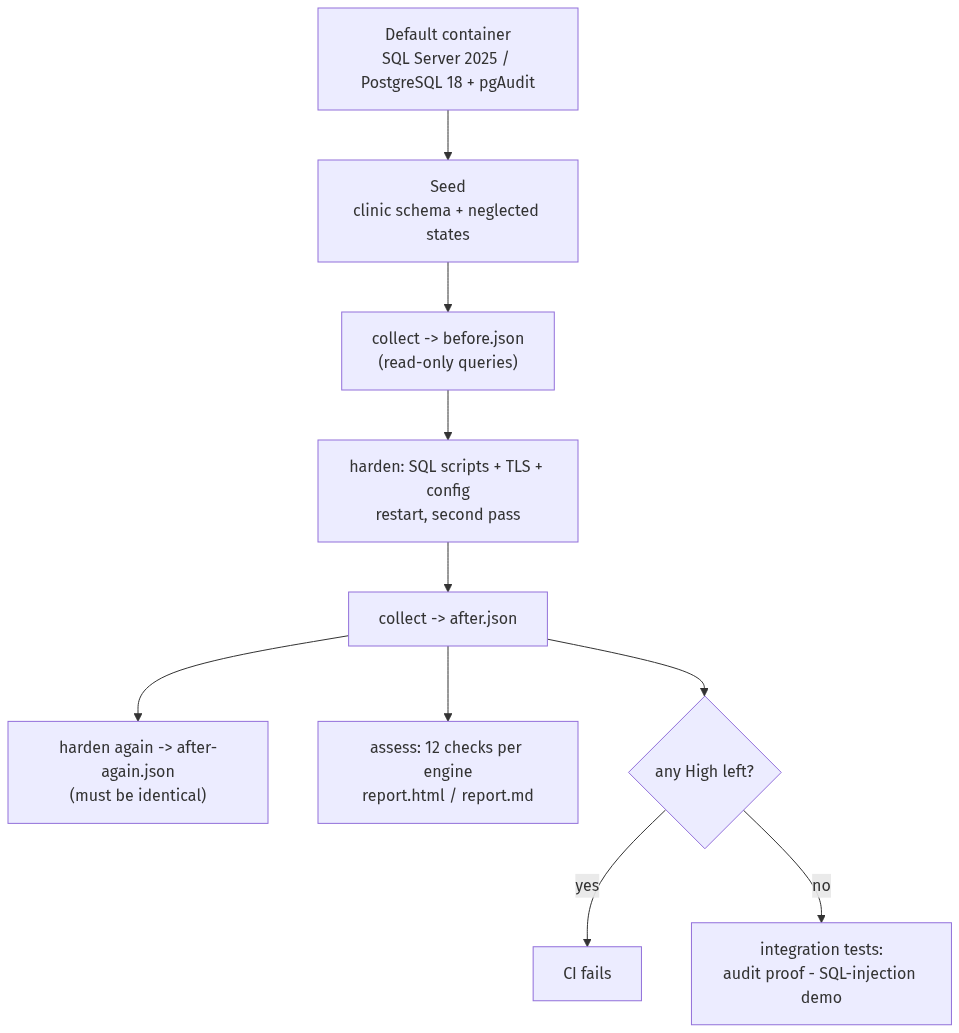
TL;DR: A default SQL Server 2025 and a default PostgreSQL 18 are assessed with 12 checks each, hardened with idempotent scripts (TLS, TDE or pgcrypto, least privilege, a working audit trail), assessed again with the same code, and attacked with a small SQL-injection demo before and after the fix. Everything runs in GitHub Actions against containers. The CI runs are real; the data is synthetic. It has never been run on a production server.
| Role played | Database / security engineer bringing two neglected database servers to a defensible baseline |
| Environment | Public GitHub repository, GitHub-hosted Ubuntu runners, SQL Server 2025 Developer and PostgreSQL 18.6 containers |
| Tools | Python 3.12, pyodbc + ODBC Driver 18, psycopg 3, pgAudit, pgcrypto, OpenSSL, pytest, ruff, mypy, gitleaks |
| Deliverable | Assessment toolkit (24 checks), seed and hardening scripts, audit proof, SQL-injection demo, CI, branch ruleset, demo PRs |
1. Problem
Database servers are often installed with defaults and never revisited: the built-in administrator is still enabled, connections are not encrypted, nothing is audited, and the application connects with an account that owns everything. Hardening guides list the fixes, but two questions usually stay open: did the fix actually change the server, and did it break the application? This lab answers both with evidence: the same checks run before and after, and the application's own queries run against the hardened server.
2. Design
- Collect → snapshot → checks. A collector runs read-only queries (
SELECT/SHOWonly; a unit test fails if a query contains anything else) and saves a JSON snapshot of named datasets, each with a status. Checks are pure functions over that snapshot, so they are unit-tested without a database and work offline on a snapshot from any server. - No silent passes. If a dataset could not be collected, every check that needs it reports Not evaluated. If the server does not report a setting at all, the check reports that it cannot confirm it is safe. The CI gate fails on a High finding or a High check that could not be evaluated.
- Same engine shape for both databases. One catalog, one report, one gate; SQL Server names compare case-insensitively and PostgreSQL role names case-sensitively, as each server does.
- Before is honest. Default containers already pass some checks, so a seed script recreates a few common
neglected states (an app login that is
db_owneror owns its tables,TRUSTWORTHYon, a plaintext national-ID column…). The results say which "before" findings come from the defaults and which from the seed.
3. Checks
| Id | SQL Server | Sev | Id | PostgreSQL | Sev | |
|---|---|---|---|---|---|---|
| MS-01 | sa enabled or not renamed |
High | PG-01 | trust/password/md5 in pg_hba |
High | |
| MS-02 | SQL logins without password policy | Medium | PG-02 | MD5 password hashing | Medium | |
| MS-03 | xp_cmdshell on |
High | PG-03 | TLS off or not enforced | High | |
| MS-04 | Risky surface options | Medium | PG-04 | Unexpected superusers / privileged app role | High | |
| MS-05 | Encryption not forced | High | PG-05 | pg_hba open to any address |
Medium | |
| MS-06 | No TDE | Medium | PG-06 | pgAudit not configured | High | |
| MS-07 | Audit misses key events | High | PG-07 | Connection logging incomplete | Medium | |
| MS-08 | Unexpected sysadmins | High | PG-08 | PUBLIC can create in public |
Medium | |
| MS-09 | guest can connect |
Medium | PG-09 | App role over-privileged | Medium | |
| MS-10 | App login over-privileged | Medium | PG-10 | SECURITY DEFINER without search_path |
High | |
| MS-11 | TRUSTWORTHY on |
High | PG-11 | Untrusted language marked trusted | High | |
| MS-12 | Cross-database ownership chaining | Low | PG-12 | Sensitive column in plaintext | Medium |
Each check, its query and its hardening step are described in docs/checks.md.
4. Hardening
- SQL Server: a named
lab_adminreplacessa, which is renamed and disabled last (the run still holds the connections it opened assa); the built-in Windows principals the Linux image makessysadminare removed; risky options are turned off (only when they differ, because SQL Server on Linux rejects options it does not support); a lab certificate plusforceencryption; TDE with a certificate whose backup must, on a real server, be stored offline; a server audit for failed logins and role/permission changes plus a database audit of every SELECT onpatients; the app login losesdb_ownerand gets a role with exactly the statements it needs. - PostgreSQL:
pg_hba.confwithscram-sha-256only andhostsslfor the Docker bridge range; TLS on; the app role loses CREATEDB, its password is re-hashed with SCRAM, and its tables move to a NOLOGIN owner role;PUBLICloses CREATE onpublic; theSECURITY DEFINERfunction gets a fixedsearch_path; the national ID becomes a pgcrypto-encryptedbyteawith the key from the environment; pgAudit logsroleandddl, and every read ofpatientsthrough object auditing. - Two passes and a third. Some settings need a restart, and the pgAudit extension can only be created once the library is preloaded, so hardening runs before and after the restart. A third run must leave the snapshot unchanged; CI compares them.
5. Audit proof and SQL injection
After hardening, the integration tests cause the events and then find them: a failed login, a role membership
change and a read of the patients table, from sys.fn_get_audit_file on SQL Server and from the PostgreSQL log
(core log for the failed login, pgAudit for the other two).
The demo application has one lookup, find_appointments(patient_name), written twice. The vulnerable version pastes
the name into the SQL text; the fixed version passes it as a parameter. Both run as the least-privileged app login.
Least privilege does not stop the injection — the vulnerable lookup still leaks every patient's name — but it does
stop the damage: a stacked DROP TABLE is refused because the app login no longer owns the table. The parameterized
version treats every payload as data.
6. Results
All numbers come from GitHub Actions runs on 2026-10-01. The baseline is the first fully green run on main,
run 36903937272: all 5 jobs passed,
107 unit tests passed with 96.75 % coverage, and each database job passed its 8 integration tests. The full reports
from that run are in docs/example-report-mssql.html and docs/example-report-postgres.html.
Before and after hardening (same checks, same code):
| Engine | Before: High / Medium / Low | After: High / Medium / Low | Not evaluated (after) |
|---|---|---|---|
| SQL Server 17.0.5005.3 (2025), Enterprise Developer | 7 / 6 / 1 | 0 / 0 / 0 | 0 |
| PostgreSQL 18.6 with pgAudit | 11 / 11 / 0 | 0 / 0 / 0 | 0 |
Where the "before" findings came from:
| Engine | From the container defaults | From the seed |
|---|---|---|
| SQL Server | 9: sa enabled and named sa (MS-01 ×2), sa without expiry (MS-02), remote access on (MS-04), encryption not forced (MS-05), no TDE (MS-06), no audit (MS-07), BUILTIN\Administrators and NT AUTHORITY\NETWORK SERVICE in sysadmin (MS-08 ×2) |
5: app login without password policy (MS-02), guest access (MS-09), app login db_owner (MS-10), TRUSTWORTHY (MS-11), cross-database chaining (MS-12) |
| PostgreSQL | 13: six trust rules (PG-01 ×6), SSL off and a non-TLS remote rule (PG-03 ×2), a rule open to every address (PG-05), no pgAudit (PG-06), connection logging off and a bare log prefix (PG-07 ×3) |
9: app password stored as MD5 (PG-02), app role with CREATEDB (PG-04), PUBLIC CREATE on public (PG-08), app role owning two tables and their two identity sequences (PG-09 ×4), SECURITY DEFINER without search_path (PG-10), plaintext national ID (PG-12) |
MS-03 and PG-11 passed before and after: SQL Server on Linux does not support xp_cmdshell, and the PostgreSQL
container has no untrusted language installed.
Idempotence: on both engines the snapshot taken after a third hardening run was identical to the "after" snapshot (timestamps and the live session list excluded).
Audit proof (events caused by the tests, then found):
| Event | SQL Server (sys.fn_get_audit_file) |
PostgreSQL |
|---|---|---|
| Failed login | LGIF for clinic_app: "Password did not match that for the login provided" |
FATAL 28P01 password authentication failed for user "clinic_app" (server log) |
| Role membership change | APRL by lab_admin: ALTER SERVER ROLE securityadmin ADD MEMBER [audit_probe_…] |
pgAudit AUDIT: SESSION … ROLE, GRANT ROLE |
| Read of patients | SL on patients by clinic_app |
pgAudit AUDIT: OBJECT … READ, SELECT, TABLE, public.patients |
SQL injection, both engines, as the least-privileged app login: the vulnerable lookup returned 1 row for
"Ana Example", all 3 appointments for x' OR '1'='1, and all three patient names through a UNION payload; the
fixed lookup returned the one correct row and nothing for every payload. A stacked DROP TABLE appointments through
the vulnerable lookup left the table in place on both engines; on PostgreSQL the refusal itself was observed
("must be owner"), on SQL Server the test checks only that the table still exists. The app login could
not DELETE from patients.
Ruleset 24324399 on main: pull request required, all 5 checks required and up to date, linear history, no force
pushes or deletion.
Two demo pull requests, both blocked (closed unmerged):
| PR | Change | What failed | Merge |
|---|---|---|---|
| #1 | Remove forceencryption = 1 from the SQL Server configuration |
mssql at the gate: MS-05 High remained after hardening (run) |
Blocked |
| #2 | The "fixed" lookups build the SQL from the input again | unit (the payload is no longer a parameter) and both database jobs (payloads return rows) (run) |
Blocked |
In PR #2 the linter stayed green: ruff's SQL-injection rule does not see .format() on a constant, so only the
tests stood between the change and main.
Final review fix pass (PR #4,
run 36908024250). An independent
review found two real gaps, each fixed with tests that failed first: PG-06 passed when pgAudit was configured as
all, -role, which turns off a required class; and PG-04/PG-09 ignored PostgreSQL role membership, so an app role
granted a superuser or owner role looked clean. A third suspicion, that pgAudit writes the app password to the log when
hardening re-runs, was tested and not confirmed: a new integration test finds the ALTER ROLE audit line and no
password in it, and stays as a guard. After the fixes all 5 checks passed, with 112 unit tests (96.81 % coverage) and
both engines still at 0 High / 0 Medium / 0 Low after hardening.
7. Lessons
- SQL Server on Linux is not SQL Server on Windows. The first run failed because
sp_configure 'xp_cmdshell'is rejected on Linux. The hardening script now changes an option only when it differs from the target, and MS-03 simply passes on Linux. - The defaults hide surprises worth finding. The first complete run showed two Windows principals in
sysadminon a Linux server. The assessment caught them after hardening, and they are now removed rather than allow-listed. - Log formats bite in small ways. The PostgreSQL CSV log doubles the quotes around the user name, so the test missed the failed login until it matched the escaped form; the hardening was right, the test was not.
- Tests can fail for the wrong reason. A test helper's parameter called
settingsswallowed PostgreSQL's dataset of the same name, and ten tests failed although the code was correct. The helper now takes it positionally.
8. Limits
- Containers and synthetic data; never run on a production server.
- CIS benchmark areas are named; recommendation numbers are not quoted.
- PostgreSQL encryption at rest is a pgcrypto column; volume encryption is the real control and is not tested. PG-12 checks the column type, not that the bytes are encrypted.
- MS-03 (no
xp_cmdshellon Linux) and PG-11 (no untrusted language installed) pass before and after; they are unit-tested only. - Database-scoped checks look at the application database; MS-10 and PG-09 are not a full effective-permissions engine.
- Shipping the audit trail to Wazuh is documented (
docs/wazuh-shipping.md) but not run.
9. Reproduce it
Fork the repository and enable Actions: every push runs the whole lab. Locally (Linux, macOS or WSL with Docker),
follow the README's quick start: scripts/run-lab.sh postgres and scripts/run-lab.sh mssql write the snapshots and
reports to out/.
10. Mapping
| Framework | Items |
|---|---|
| CIS Controls v8 | 3.10 encrypt data in transit, 3.11 encrypt data at rest, 4.1 secure configuration process, 5.4 restrict administrator privileges, 6.8 role-based access control, 8.2 collect audit logs, 16.12 code-level security checks |
| MITRE ATT&CK | T1190 Exploit Public-Facing Application (SQL injection), T1110 Brute Force (failed logins audited), T1078 Valid Accounts (default administrator), T1098 Account Manipulation (role changes audited) |